How do I make a Zombie or Hotel Lobby video from my photo?
For SnapToClip’s Zombie love story or Hotel Lobby duo look, use one authorized photo showing one or two clearly adult, fully clothed people. Pick the template in the homepage studio and check service availability before uploading. These are five-second single-reference concepts, with original sound options rather than a copied song or celebrity performance.
What does the Zombie love story template request?
The scene direction combines gentle theatrical zombie makeup, a rustic cabin and a warm doorway toward a meadow. It asks for tender expressions, soft mist and a slow camera push. This is a non-graphic fantasy scene: blood, wounds and gore are excluded.
This template does not currently assemble an apocalypse encounter, a running embrace and a separate happy-memory sequence. If a story needs those distinct moments, plan multiple shots and editing rather than assuming a five-second generation will deliver every beat. A couple should appear together in one input photo.
What does the Hotel Lobby duo template request?
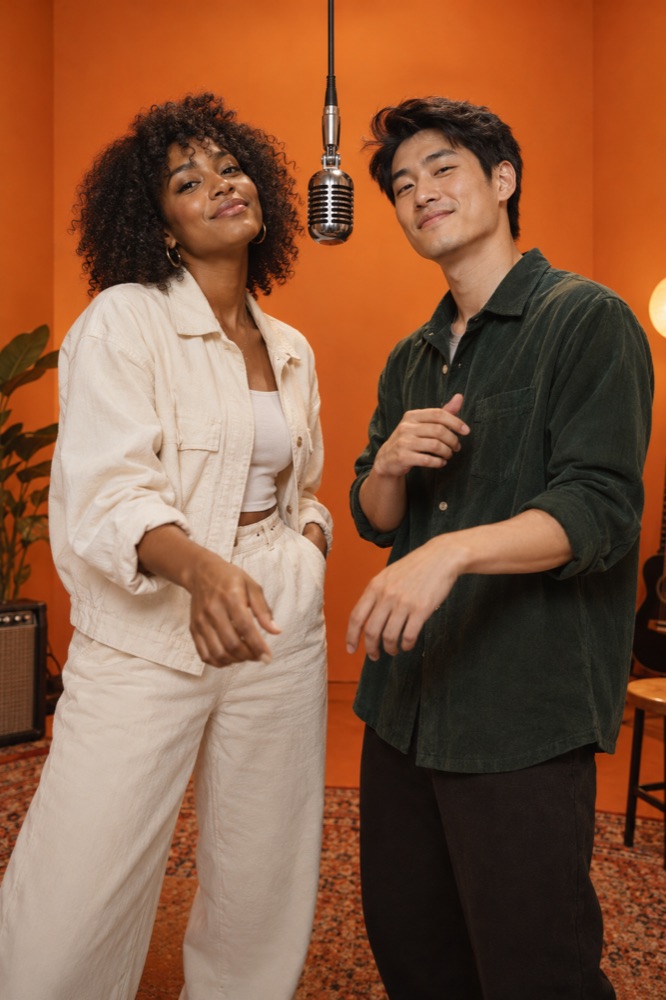
The Hotel Lobby duo concept places one or two adults in a warm orange recording studio with a suspended vintage microphone. It requests gentle upper-body movement, friendly confidence and a subtle camera push, keeping the subjects in frame. It is a stylized performance scene rather than a literal hotel travel video.
The sound direction requests an original upbeat instrumental groove with bass and drums. It does not include a named song, recognizable commercial melody, lyrics or cloned voice. The preview image illustrates the set and lighting; it is not evidence of a completed AI performance.
Which photo gives the model a useful reference?
Choose a sharp photo with even light, visible eyes and no hands obscuring faces. Both adults should fit inside the portrait crop. Avoid extreme angles and heavy beauty filters, which remove details that distinguish the people in the reference.
Use natural, fully clothed adult photos with permission from everyone depicted. Existing zombie makeup is not required: the scene direction supplies the non-graphic styling. If age, consent or content suitability is unclear, choose another image.
How should I judge the finished video?
Check whether each face is recognizable, whether bodies and hands move plausibly and whether the shot stays within the intended mood. Listen to the actual downloaded file when sound is enabled. Do not judge audio from an illustrative still or a silent preview.
AI can alter appearance and movement even when the prompt asks for consistency. A provider-completed clip is still withheld if content review is uncertain or unavailable. Generation and sound launch checks remain separate from choosing a template; the studio shows whether creation can currently start.
Find your scene.
Browse a template, then check creation availability in the homepage studio.
Explore the looks ↗